A Message to Our Customers in Response to COVID-19

0
- No products in the cart.
Ask The Online NX Community
A central location for the users of NX, Teamcenter, Solid Edge, and all things PLM. Because who has time to google anymore?
Notifications
Clear all
NX CAM
1
Posts
1
Users
0
Reactions
4,243
Views

Topic starter
07/10/2014 1:30 pm
Add a Custom Command for Header Lines for Post Processing in NX 9 CAM
Follow these simple steps to create a Custom Command in NX CAM to add to a post processor for header lines to be output from a post processor:
Start Postbuilder.
Select the custom command tab.
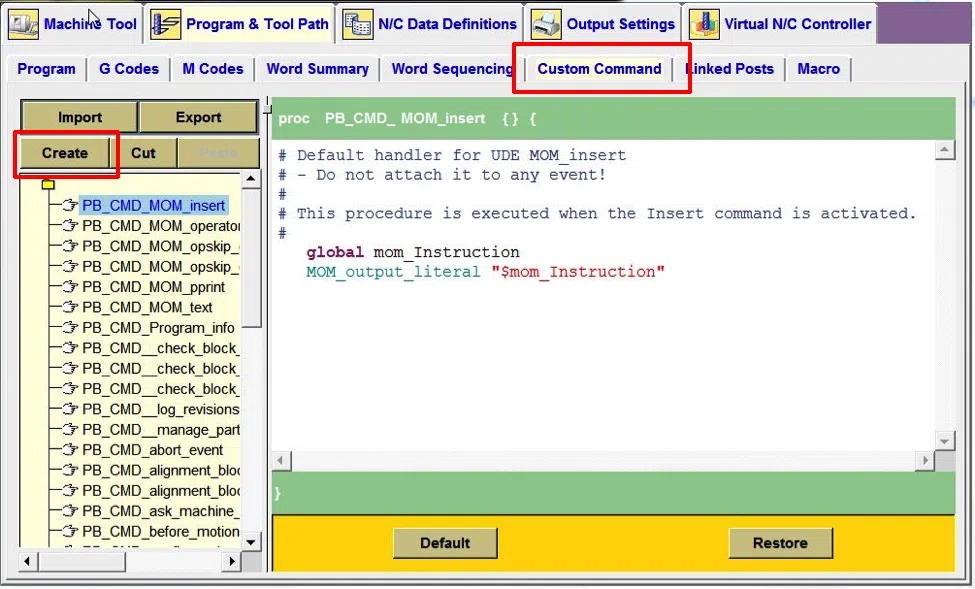
Select the Create option.
Right mouse button on the new custom command and rename it. To PB_CMD_header line.
Highlight everything in the right window, as displayed below.

Once everything is highlighted, select the delete key.
Select the lines below:
#=============================================================
proc PB_CMD_header_line { } {
#=============================================================
#This Custom Command will output the header information
#this will output information associated with a program
global mom_oper_program
global mom_part_name
global mom_date
global mom_logname
MOM_output_literal "(PROGRAM NUMBER: $mom_oper_program)"
MOM_output_literal "(PART NAME : $mom_part_name)"
MOM_output_literal "(POSTED DATE : $mom_date)"
MOM_output_literal "(PROGRAMMED BY : $mom_logname)"}
Copy the lines selected above and paste them into the right side of the dialog box. It should appear like this:
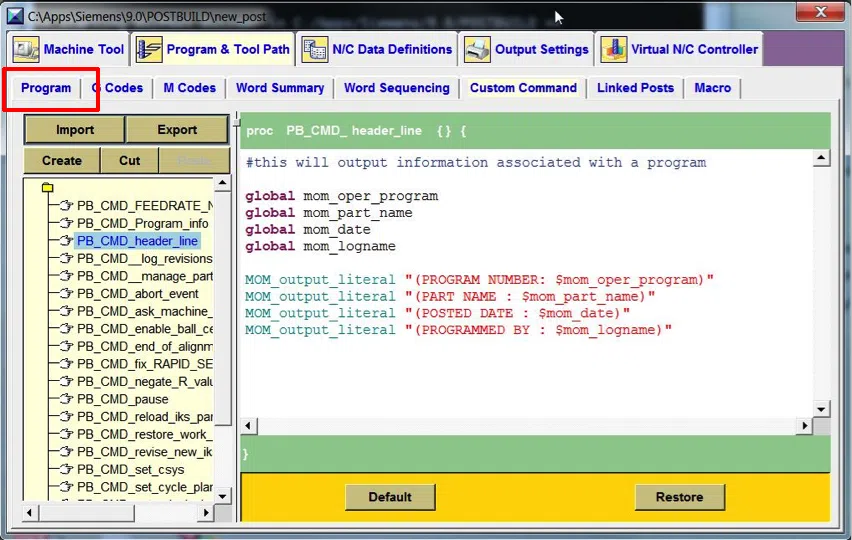
Select the Program Tab.
Select the Program Start Sequence.
Select the name of the custom command you just created. In this case it should be the PB_CMD_header line.

Select the Add block option.
Drag the command after the rewind stop code.
This will add the header lines to the beginning of the CNC program